
“…I’ll take that fully loaded WITH the kitchen sink please.”
I’m super stoked. Last Saturday I finished building the sweetest computer I’ve owned. Here are the specs:
Intel Core i7 920 Bloomfield
Cooler Master V8
EVGA E758-TR SLI 1366 X58 ATX Motherboard
EVGA GeForce 9800 GTX+ 512MB 256-bit GDDR3 Video
12GB Corsair XMS3 DDR3 1600 Memory
Intel X18-M 80GB (Dane-Elec) “system” drive
WD 300GB Velociraptor “data” drive
Antec TruePower Quattro 850W PSU
Cooler Master Cosmos S case
Windows 7 x64 Ultimate
I have to admit that the Cosmos S case is probably the sweetest case I’ve seen or used. The only thing it’s missing is a removable motherboard tray. I discovered this inconvenience when I found the V8 required the motherboard to be OUT in order to install it. That added another 20-30 minutes to the build time, which in total took about 3 hours total. The V8 has screws/nuts which bolt it to the motherboard, smashing it tightly against the i7 processor. With a little Arctic Silver, this box should over-clock nicely.
Booting for the first time was a little nerve-wracking but proved to be a non-issue. After spending this amount of money, one can only hope that nothing arrived DOA or didn’t short out during installation.
At first the RAM booted 1066 but that was easily resolved in the BIOS by setting them to 1600.
The CASE

Cooler Master Cosmos-S
I upgraded to the Cooler Master Cosmos S which is the first case I’ve purchased in 10 years – lol. My old case was a bland, cream colored case with no extras. It didn’t even have front USB ports or audio jacks so this was a GIANT upgrade for me! 🙂 Now I have 4 USB 2.0’s, eSATA, Firewire, audio, and mic. The Cosmos S is tool-less case and comes stock with 3 120mm fans and 1 20 centimeter side panel fan. Yeah you read that right, a 20 CENTImeter fan. The 120’s are on the front, back, and top. Make no mistake, this case is HUGE! The other computers in my house have ran and hid. Its dimensions are 10.5 in x 24.7 in x 23.5 in (WxDxH). Try measuring that out, its enormous.
Everything fit nicely into this case except the V8 which is ironic since it is another Cooler Master product. I had to remove the 20cm side panel fan to fit in V8 but the trade off is well worth it. My i7 idles at 28-29 C. It is not overclocked… yet. The case is very roomy and came with all the extras. It included a ton of SATA cables, 1 PATA cable, small 4″ zip ties, adjustable cable management ties with stickies on them… and several extension for power leads. The extensions seemed to have been included since the case is so large.
Installing Cooler Master V8 onto Intel Core i7 920
Cooler Master V8, i7 920, and Arctic Silver 5. This installation can be intimidating for a newb, but go slow and be careful and you’ll be fine. The V8 bolts to the motherboard so the board needs to be OUT of the case to install it. First your gonna drop in the CPU and clip it down in the motherboard. The EVGA board has a clip that required considerable pressure to close the latch. Please make sure you have the i7 seated correctly before locking it in, not doing so could result in bent pins and result in damage to both the board and processor. 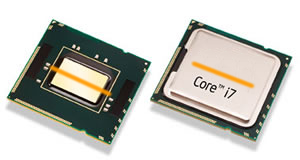 There are some great YouTube videos if you’re looking for a tutorial. Next, apply the Arctic Silver 5 compound using the grain of rice method. The line you’ll make is about the same thickness. The length should be about 1.5 times the length of a grain of rice. That just over 1/2 an inch. See Arctic Silver’s tutorial here.
When you lower the V8 onto the board you probably need to be holding the board as I did. Make sure the V8’s fan blows air OUT of the case by aiming it toward the rear exhaust fan. Air circulation is your friend. Lower the V8 flat onto the processor so the thermal grease flattens out like a pancake. Also twist the V8 back and forth once to help spread the grease out. Don’t pick it back up to check the dispersion, it can cause air bubbles which will kill your temps. Immediately, bolt on the bottom plate and tighten down the screws in a “star” pattern. If you make a mistake and need to cleanup thermal grease use 91% alcohol (about $2 at the drug store) and a lint free cloth. I’ve heard coffee filters can work good but I’ve only used q-tips. Gauze might also be a good option.
More to come….